
Generate Videos with Claude Code: A Practical Remotion Guide
Claude Code writes code. Can it generate videos? With Remotion, yes.

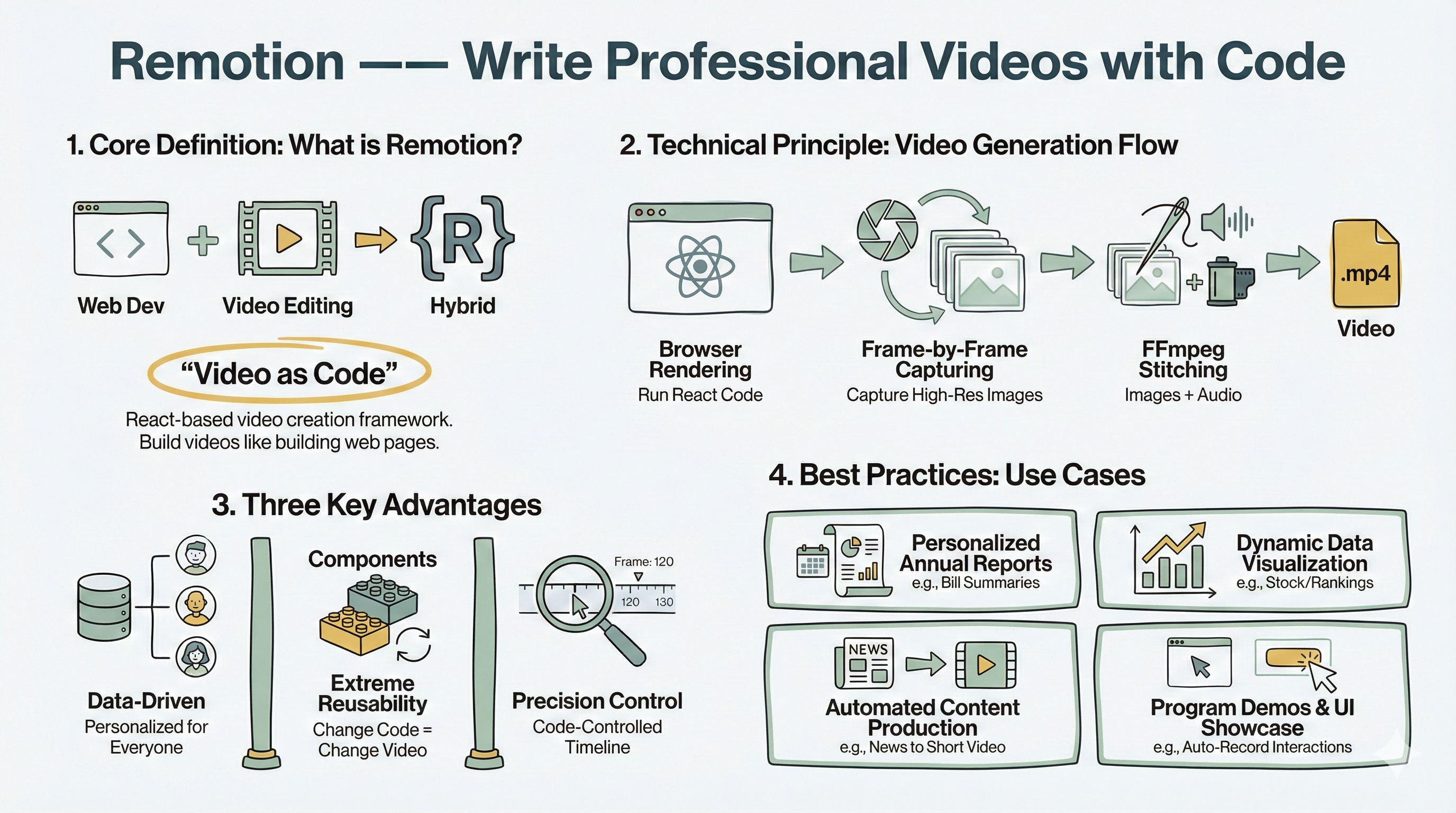
Remotion is a frontend framework built on a simple idea: video as code. It renders web pages frame by frame, then stitches those frames into video. This means you can build videos using React components and control every frame with code.
This isn’t a universal solution. Remotion produces videos that feel more like animated presentations—ideal for data visualizations, mathematical concept explanations, and UI demonstrations. It’s not built for traditional editing or special effects. But for technical content creators, that’s exactly the point: reproducible, customizable, and programmable.
Part 1: Installation and Setup
Installing Remotion Agent Skills
Remotion now supports AI agent skills. Prerequisites: Node.js installed on your system, and run npx installation.
Run this in your terminal:
npx skills add remotion-dev/skillsTesting with Official Examples
After installation, test with official examples. If you don’t have Bun, install it first:
# macOS/Linux
curl -fsSL https://bun.sh/install | bash

# Or visit https://bun.com/docs/installation
Create a test video:
bun create videoThis displays a list of official examples. Select one to preview and verify your environment is configured correctly.
Part 2: Planning Video Content
Creating Your Project Structure
Before generating videos with Claude Code, plan the structure. Create a project folder:
mkdir my-video
cd my-video
Writing an Effective Planning Prompt
Enable Claude Code’s plan mode and input a detailed requirements prompt. This is the critical step—good planning directly determines the final output.
For a Claude Code introduction video, your prompt should include:
Video Goal: Help developers understand what Claude Code is in 60 seconds
Target Audience: Developers with programming experience but no Claude Code experience
Duration Specs: 60 seconds (30fps = 1800 frames)
Available Assets: Logo, simple graphics, and text animations
Style Preferences: Clean modern, dark background, high contrast
Request Claude to provide:
Storyboard script (content, duration, visual elements for each scene)
Copy (voiceover or subtitles)
Technical implementation hints (Remotion components and animation effects needed)
Prompt Example:
I want to create a tutorial video introducing Claude Code. Please help me plan the content:

**Video Objectives**:

- Help developers who know nothing about Claude Code understand what it is and what it can do within 60 seconds

- Inspire them to think “I want to try this”

**Target Audience**:

- Developers with basic programming experience

- May have heard about AI-assisted programming but haven’t used Claude Code

**Video Duration**: 60 seconds (30fps = 1800 frames)

**Available Assets**:

- @claudecode.png (Claude Code logo/screenshot)

- Can generate simple graphics and text animations

- Do not use live-action footage

**Style Preferences**:

- Clean and modern, similar to Apple keynote style

- Color scheme: dark background + bright text (high contrast)

- Fast-paced animations, high information density

Please provide:

1. Storyboard script (content, duration, and visual elements for each scene)

2. Copy (voiceover or subtitle text)

3. Technical implementation hints (which Remotion components and animation effects are needed)
Reviewing the Initial Plan
Review the plan before proceeding to the next phase. Make sure the pacing makes sense and the technical approach is feasible.
Part 3: Technical Requirements Document
Converting Storyboard to Technical Specs
Have Claude convert the storyboard into a technical document:
Great! Now convert this storyboard into a Remotion project
technical requirements document, saved as video_prompt.md. Include:

1. Project Structure: Which React components to create
2. Timeline Planning: Start frame and duration for each scene
3. Animation Specs: Entry/exit animations, easing functions for each element
4. Asset Checklist: Images, fonts, color variables
5. Copy Text: All text to display (for easy modification)

Format requirements:
- Use Markdown tables for timeline
- Use code blocks for key animation logic examples
- Extract all hardcoded values (colors, sizes, copy) as constants
Understanding the Technical Document
This step transforms creativity into executable technical specifications. Claude generates detailed documentation with frame counts, component structure, and animation parameters.
The document serves as a blueprint that eliminates ambiguity in the implementation phase.
Part 4: Generating the Video Project
Implementing with Claude Code
With the technical document ready, have Claude Code implement it:
Create this video project using Remotion based on @video_prompt.md.
Tell me how to preview it when you're done.
What Claude Code Does
Claude will:
Create the Remotion project structure
Write React components
Configure timeline and animations
Set up preview and render commands
Previewing Your Video
Preview typically uses:
npm run dev
# or
bun run dev
Your browser opens Remotion Studio, where you can view the video in real-time, adjust the timeline, and modify parameters.
The Real-World Difference
Traditional Video Production
Traditional workflows involve:
Opening video editing software
Manually adjusting timelines
Re-exporting after every change
Difficulty generating similar videos at scale
With Claude Code + Remotion
The code-based approach provides:
Code defines video structure
Modifying code modifies the video
Parameterized batch generation
Version control and reusability become simple
Ideal Use Cases
Data Visualization Videos: Use D3.js or Recharts to dynamically display data
Mathematical Concept Explanations: Use Manim.js or custom animations to demonstrate formulas
Product Feature Demonstrations: Use actual UI components to showcase interaction flows
Tutorial Videos: Code highlighting, terminal recordings, step-by-step walkthroughs
What’s Next
Understanding the Limitations
Remotion’s limitations are obvious—it’s not a replacement for Final Cut Pro or Premiere. But for scenarios requiring programmatic generation, batch production, or precise timeline control, it offers unique value.
How Claude Code Changes the Game
Claude Code lowers the barrier to entry. You don’t need to deeply learn the Remotion API—just describe the effects you want and let AI handle the implementation.
Getting Started
Try making your next technical demonstration video with it. Start with simple scenes and gradually explore more complex animations and interactions. The video-as-code approach might change how you think about content creation.
Reference Resources:
Node.js: https://nodejs.org/en/download/
Bun: https://bun.com/docs/installation
Remotion AI Skills: https://www.remotion.dev/docs/ai/skills
Remotion + Claude Code: https://www.remotion.dev/docs/ai/claude-code