
How Claude Skills Work: From Metadata to Automation
Turn Repetitive Tasks Into One-Command Workflows

If you’ve been using Claude but haven’t explored Skills yet, here’s what you’re missing: reusable workflows that turn repetitive tasks into one-command operations. Think brand-consistent presentations, automated newsletter publishing, or PDF form filling - all triggered by natural language.
This guide breaks down three things: how Skills actually work under the hood, how to use and customize them, and where to find pre-built Skills to start with.
Part 1: How Skills Load (Progressive Disclosure)
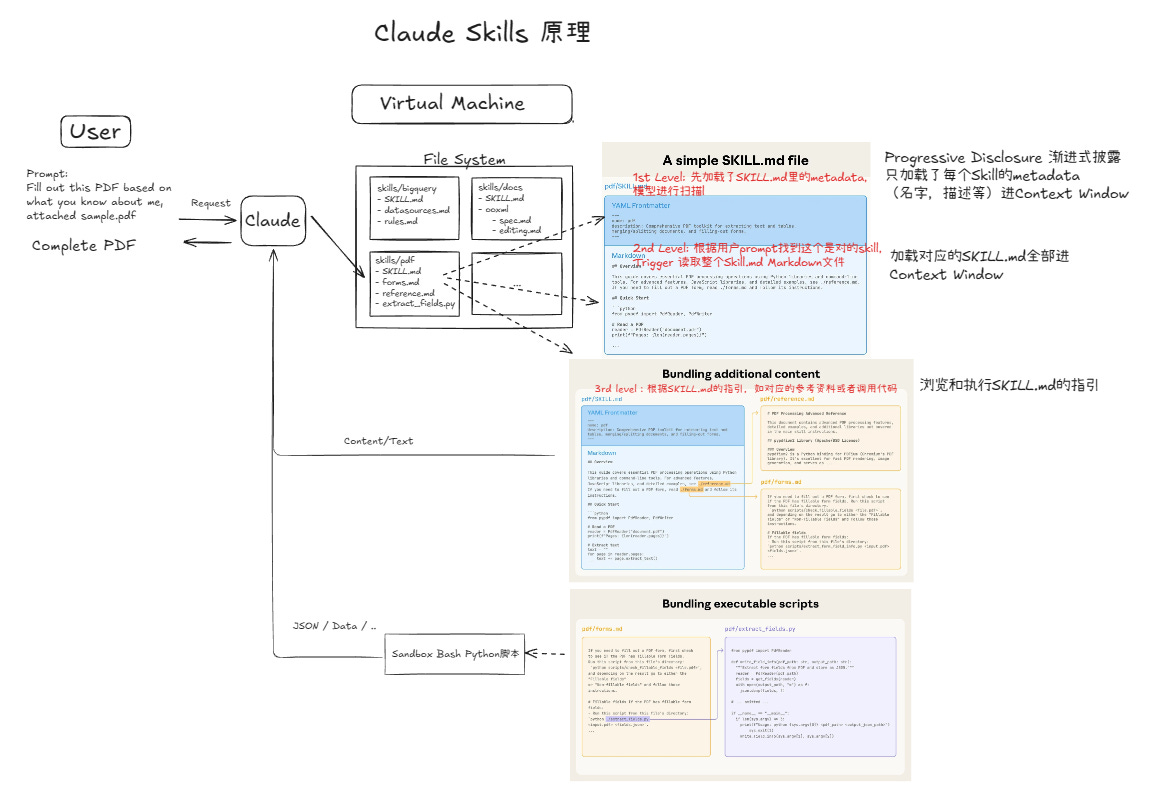
Let’s use PDF filling as an example. When you ask Claude to “fill this PDF form,” here’s what happens in the virtual machine:
Step 1: Metadata Scan
Claude doesn’t load every SKILL.md file into context. Instead, it reads just the header metadata - the name and description block at the top of each skill file. This is called progressive disclosure. It’s efficient: Claude scans skill names without burning through tokens.
Step 2: Full Skill Load
Once Claude identifies the right skill (in this case, pdf), it loads the complete SKILL.md file. This contains the actual instructions: which Python libraries to use, what code to run, how to structure the output.
Step 3: Execution
Claude follows the skill’s instructions - loading reference tables from markdown files if needed, running Python in the sandbox environment, handling file operations. After processing, it captures the results and returns the completed PDF.
The pattern mirrors how you’d use tools in real life: you skim tool manual covers until you find the right one, then read the full instructions. This keeps Claude’s context window efficient while maintaining access to dozens of specialized capabilities.
Part 2: Three Ways to Use Skills
Enable skill checking in preferences:
Add this to your user preferences so Claude always checks available skills before responding:
Always check /mnt/skills/user/ for applicable skills before responding.See what’s available:
Type “what skills do you have?” to see native Skills, your custom ones, and example Skills.
Method 1: Use Official Skills Directly
Example: Generate a SaaS landing page
I used the frontend-design and theme-factory skills to create a landing page for “FlowSync” (a fictional SaaS product). Process:
Upload a product description document or paste the content
Ask Claude to generate a landing page
Claude identifies relevant skills and builds the HTML
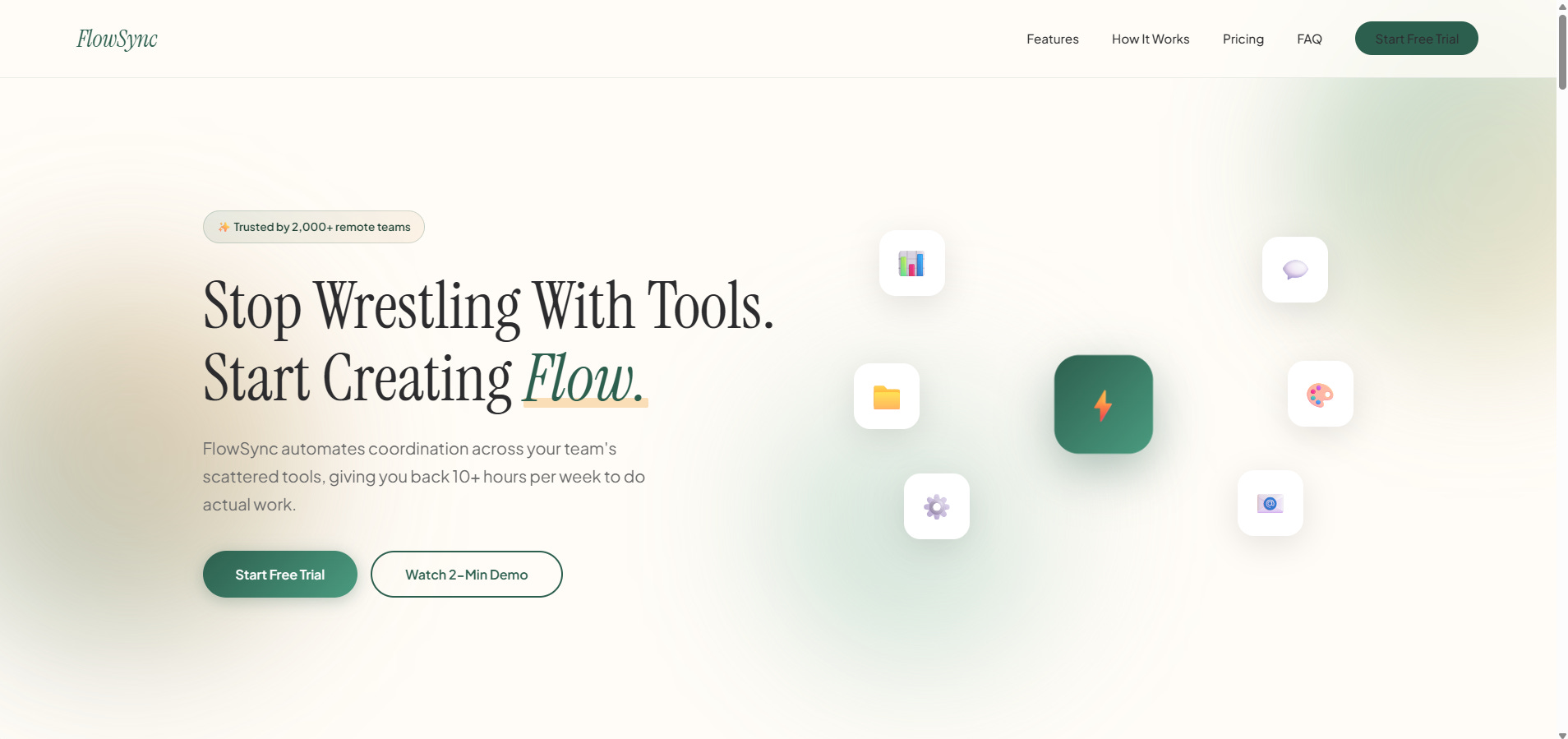
Result: A polished, brand-consistent landing page with proper color schemes, animations, and professional styling. Compare this to generating without skills - the skilled version maintains visual consistency and includes thoughtful interaction design.
Method 2: Extend Existing Skills
Base a new skill on brand-guidelines:
I created zerofuturetech-brand-guidelines by extending the example brand-guidelines skill. Here’s the prompt pattern:
Create a personal brand guidelines skill based on brand-guidelines,
called zerofuturetech-brand-guidelines.

Trigger: When creating slides, posters, newsletters, articles

Requirements:
1. Color preferences:
   - Minimalist black/white/gray base
   - Strategic accent colors for emphasis
   - Tech aesthetic, professional but approachable

2. Generate:
   - 4-5 primary colors (dark, light, neutral)
   - 2-3 accent colors
   - Font pairings (heading + body)
   - Usage guidelines per color

3. File structure:
   - SKILL.md with complete brand guide
   - Reference brand-guidelines format
   - Output as .zip file

4. Include:
   - Color usage recommendations (background/text/emphasis)
   - How to apply in different formats (pptx/html/React/docx)
   - Accessibility guidelines (contrast, readability)

Style preferences:
- Minimalist tech aesthetic
- For technical tutorials and personal blog
- Professional but not academic
After Claude generates the skill, download the .zip and import it via Settings → Capabilities → Skills → Add.
Test the new skill:
Search for current Claude Skills information, then: “Create a personal brand poster introducing Claude Skills.”
Claude will:
Search for relevant content
Load your brand guidelines skill
Generate a poster matching your style
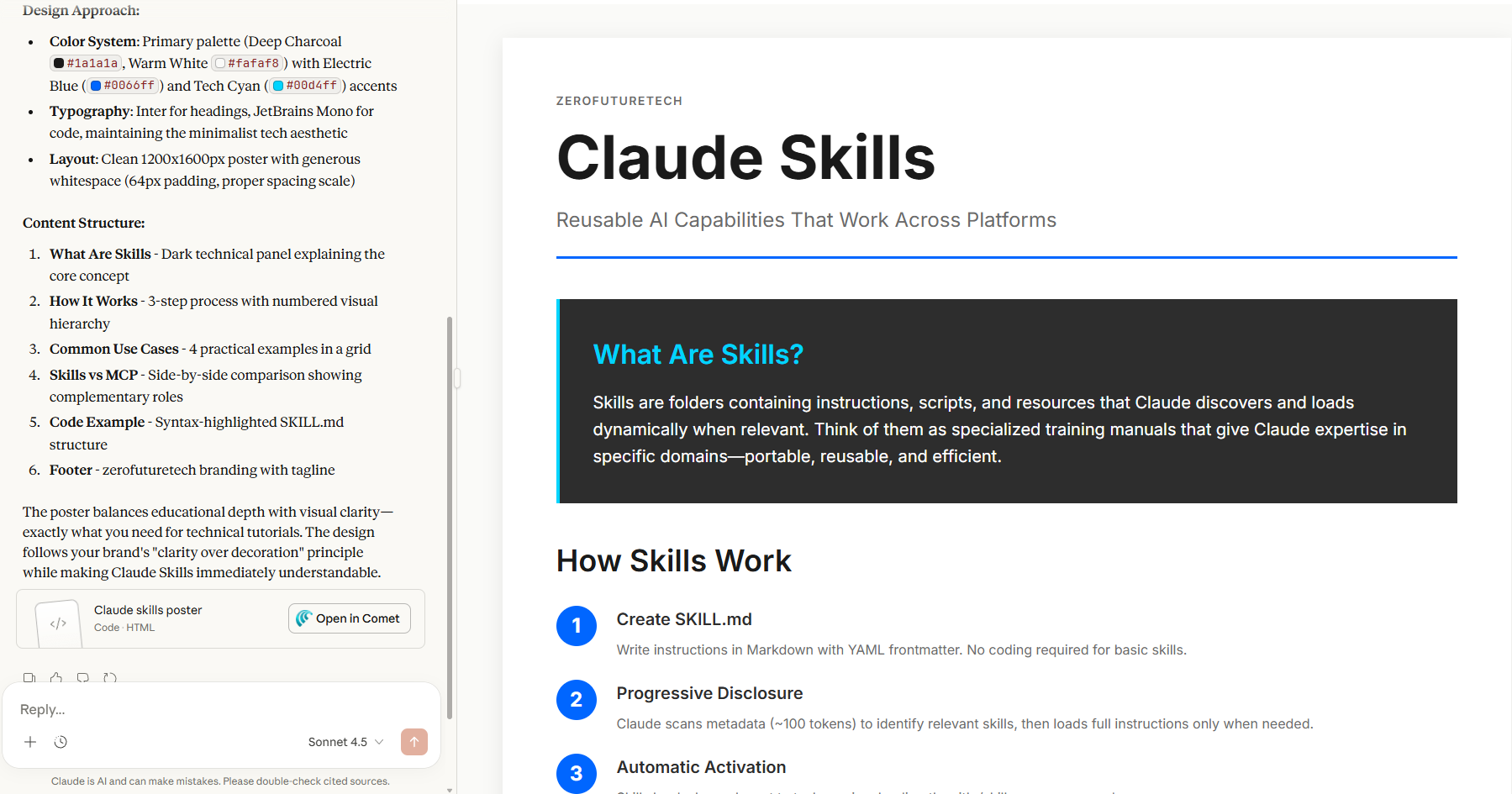
Result: Clean design, consistent color palette, minimalist aesthetic. The same skill works for presentations - maintaining brand consistency across all content types.
Method 3: Build From Scratch
Six-step framework for custom skills:
Identify the task: What’s repetitive and time-consuming? (Example: translating presentations, editing articles, publishing newsletters)
Break it down: Map out each specific action required
Brainstorm solutions: Talk through approaches with Claude. What tools or workflows could automate this?
Get a plan: Have Claude outline a specific implementation strategy
Build and test: Let Claude create the SKILL.md file, import it, run tests
Iterate: Refine based on real-world use. Skills improve with feedback.
Real example: Newsletter publishing workflow
My task breakdown:
Write/polish a newsletter post on a topic
Upload to Substack as a draft
Review and publish
I created a newsletter-writing skill that handles writing and formatting. Then I extended it with browser automation (using Claude in Chrome extension) to upload directly to Substack.
The prompt extension:
Based on newsletter-writing skill, add functionality to:
- Upload completed posts to Substack as drafts
- Navigate to zerofuturetech.substack.com/publish
- Fill in title and content
- Save as draft (never auto-publish)
Testing the workflow:
“Write a post about 2026 AI trends and upload to my Substack.”
Claude will:
Search for current AI trend information
Write the post using newsletter-writing skill guidelines
Use MCP (Model Context Protocol) to control your browser
Navigate to Substack, create a draft, paste content
If errors occur during execution, iterate on the skill file. The workflow becomes more reliable with each refinement.
Part 3: Skills Resources
Official Anthropic Skills Library:
The primary source for well-tested, production-ready skills. Start here.
Awesome Claude Skills (GitHub):
Community-curated collection of skills across different use cases. Good for discovering what’s possible.
Superpower Skills:
Focused on programming and development workflows. Recommended for engineers and technical users.
Ken Dense Scientific Skills:
Academic research and scientific paper workflows. Useful for researchers and students.
The Real-World Difference
Without skills:
You describe what you want each time. Claude generates fresh code, you adjust formatting manually, styles vary between outputs. Repetitive tasks stay repetitive.
With skills:
You trigger workflows with natural language. Claude follows established patterns, maintains consistency, handles complexity automatically. Repetitive tasks become one-line commands.
Skills turn Claude from a conversational AI into a customizable automation platform. The investment in setting up skills pays off quickly for any task you do more than twice.
What’s Next
Start with the official skills library. Pick one that matches a task you do regularly - presentations, documents, data analysis. Use it a few times to understand the pattern.
Then identify one repetitive workflow in your actual work. Break it down into steps. Create a custom skill. Refine it over a few iterations until it’s reliable.
The goal isn’t to automate everything immediately. It’s to build a growing toolkit of reliable workflows that compound over time.