
I Deep-Tested Three Claude Code Harness Skills — And Rebuilt My Development Workflow
Not a review. A teardown — the real usage record of Superpowers, gstack, and Compound Engineering

A twitter post about Harness Skills resonated with a lot of people.
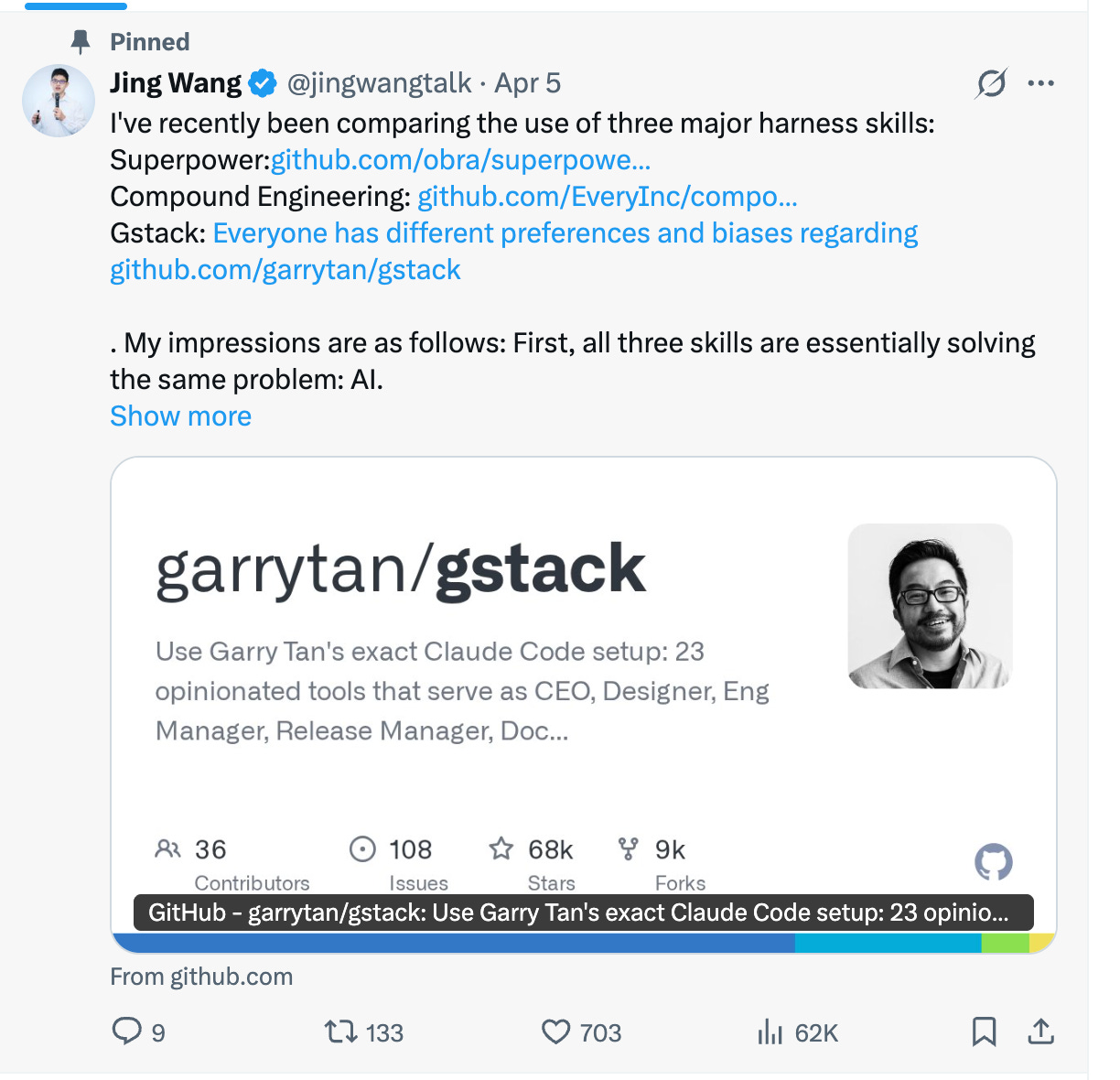
But resonance doesn’t answer the actual question: what are these tools really solving? Which one fits which situation? How do you actually get them to work for you?
Here’s the conclusion upfront: most people are using Claude Code wrong from the start. Not the wrong tool — the wrong mental model. You’re treating a system that can have real workflow discipline like a chat window.
If you are a visual learner, you are able to watch my Youtube Video (Chinese):
Welcome to follow me on X: https://x.com/jingwangtalk
Let’s Get the Concepts Straight: Three Tools, Three Disciplines
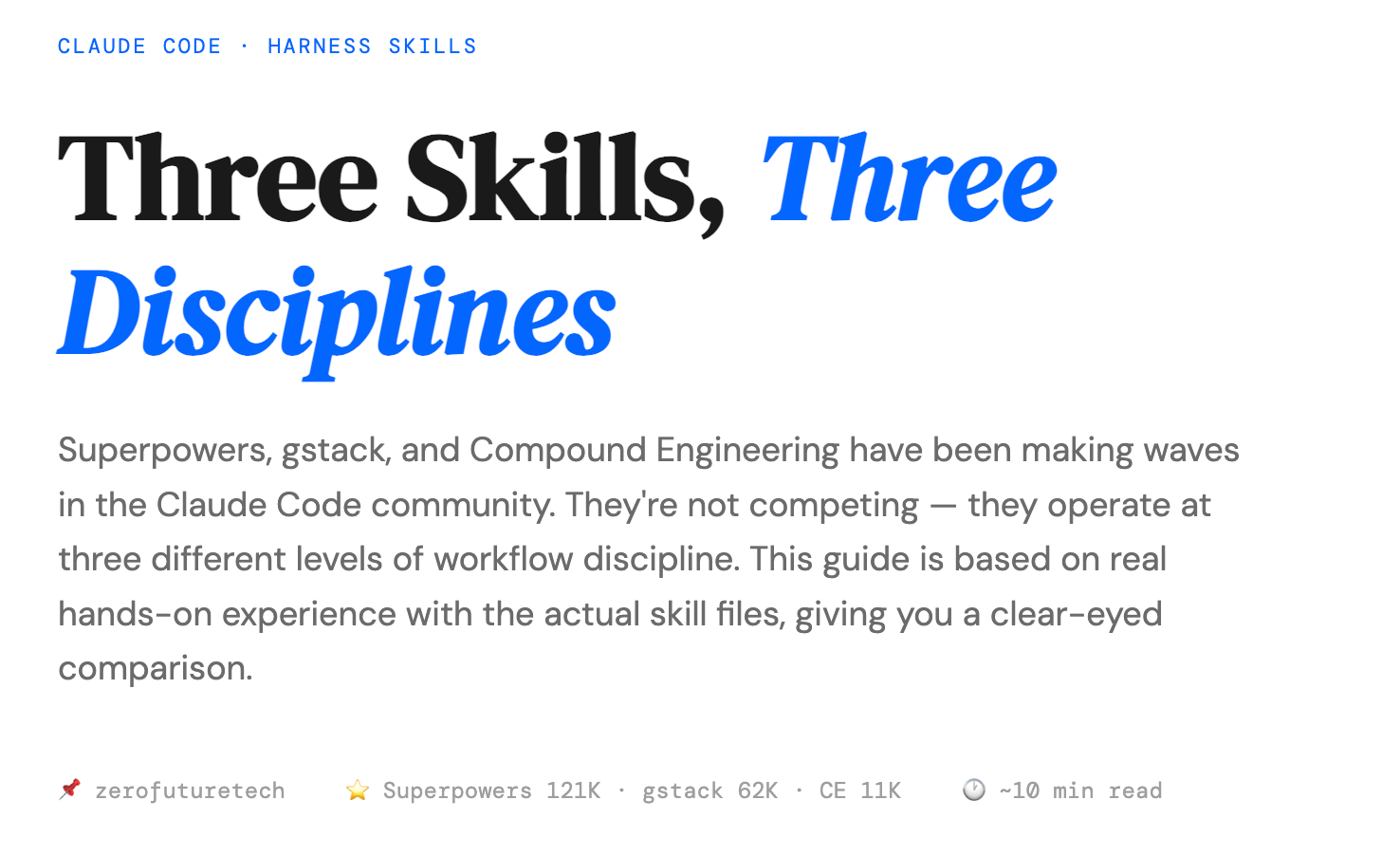
Superpowers, gstack, Compound Engineering — at their core, all three are Claude Code Skills: a set of Markdown-formatted slash commands that tell Claude which role to play at each stage and which rules to follow.
But their focus is completely different. So is the problem each one solves.
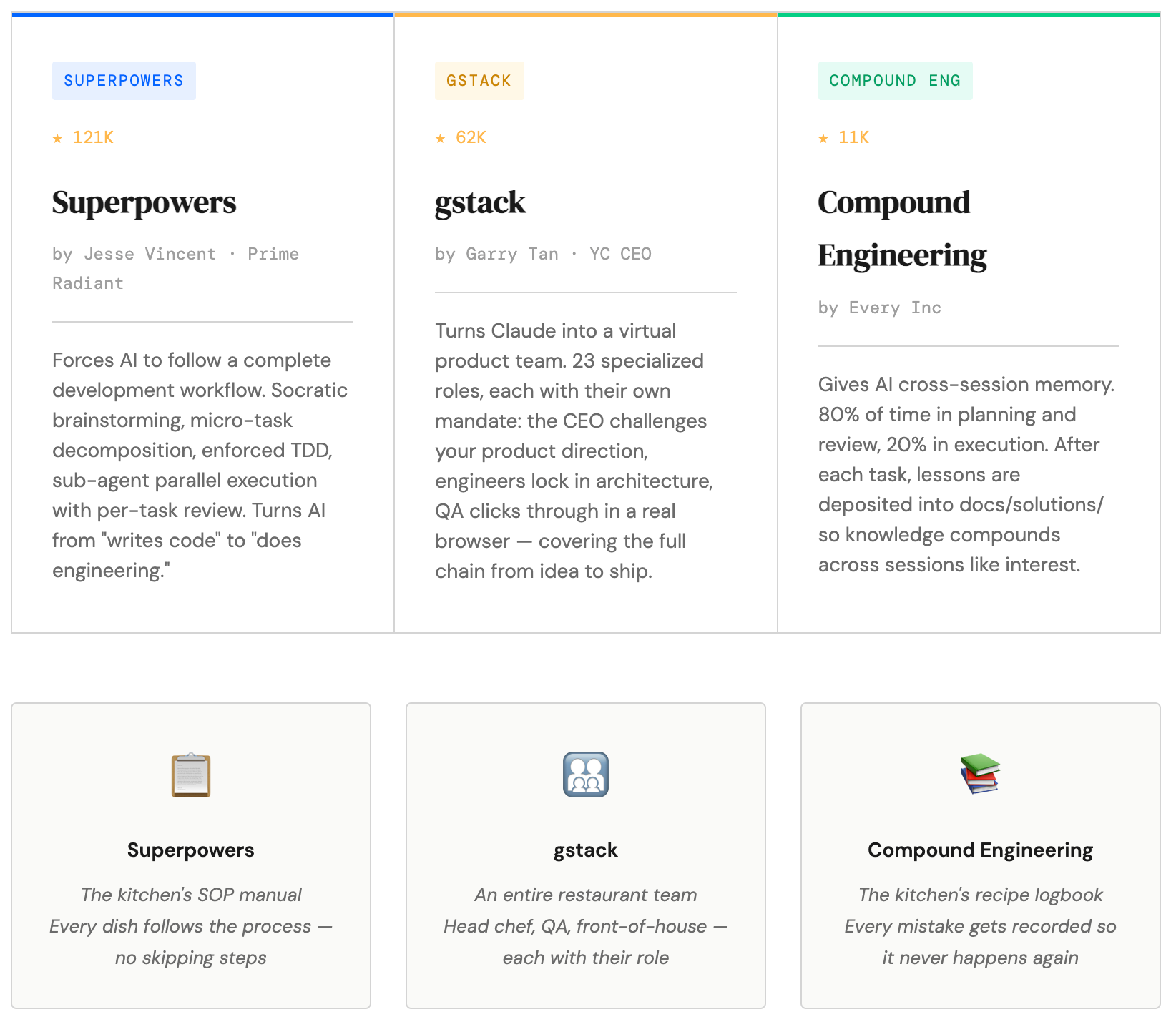
Here’s the restaurant analogy that makes it click:
Superpowers is the kitchen’s SOP manual. Every dish follows the process. No skipping steps. No chef improvising on instinct.
gstack is the entire restaurant team — head chef, quality control, front of house, finance, all with distinct roles. Its most distinctive feature: before you start cooking, it questions whether you should open this restaurant at all.
Compound Engineering is the kitchen’s failure log. Every mistake gets written down so it doesn’t happen again. Knowledge compounds inside the project like interest.
Three metaphors. Three disciplines. Keep this framework in mind — the rest follows from it.
Superpowers: Installing Discipline Into Your AI Dev Process
140,000 stars. Built by Jesse Vincent. One core claim: turn AI from “can write code” into “can do engineering.”
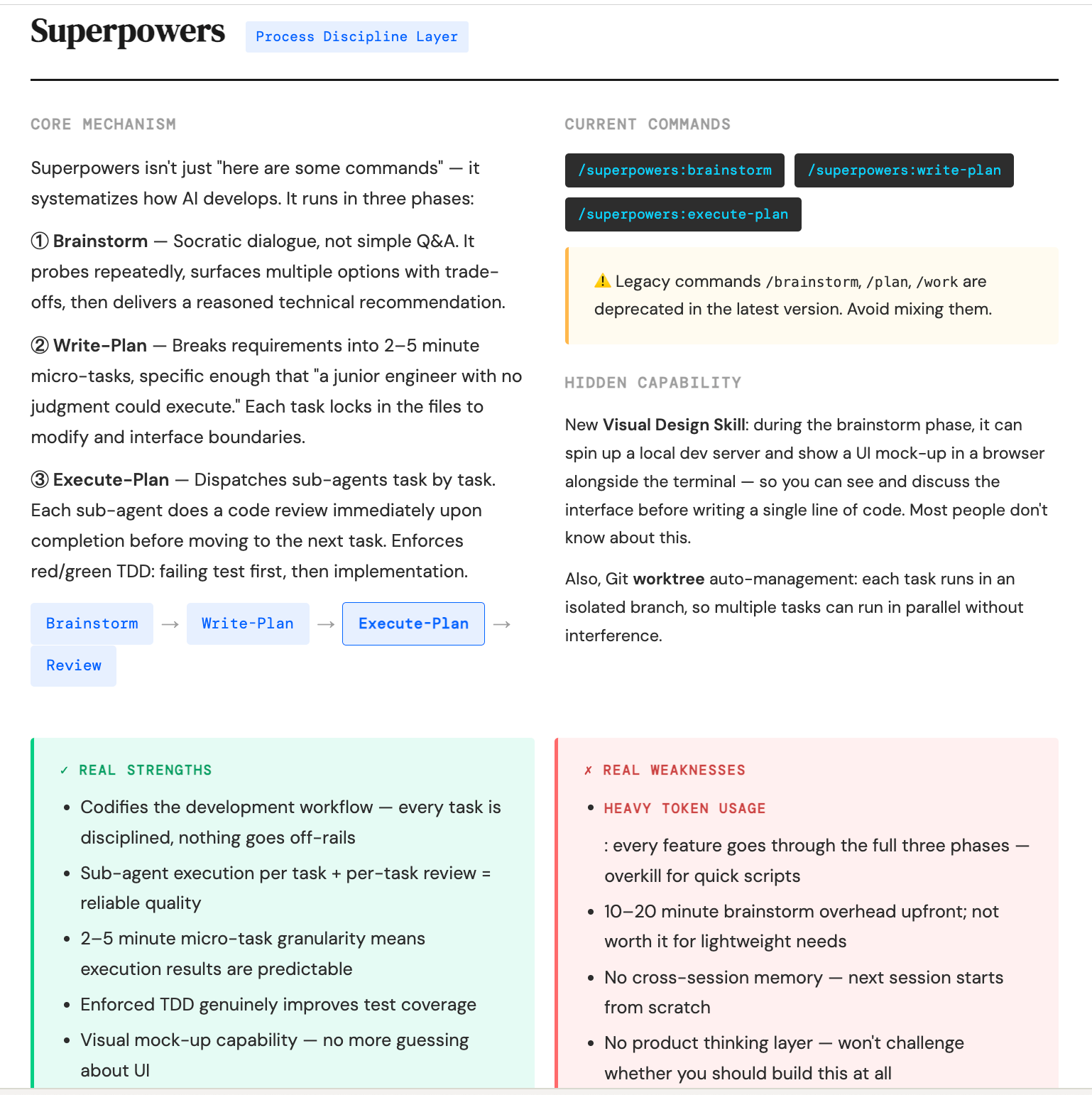
Three commands. Three mandatory phases.
/superpowers:brainstorm — Socratic Interrogation, Not a Questionnaire
This isn’t a standard “what do you want to build?” conversation. It’s Socratic interrogation — repeatedly challenging your assumptions, presenting multiple approaches and their trade-offs, and ending with a reasoned technical recommendation rather than just doing what you asked.
A lot of people think this step wastes time. That’s exactly where engineering thinking and “ship fast” thinking diverge. The faster you run in the wrong direction, the higher the sunk cost.
/superpowers:write-plan — Micro-Task Decomposition, Granular Enough for a Junior Engineer
After brainstorm, it breaks requirements into micro-tasks of 2 to 5 minutes each.
How granular? Granular enough that “a junior engineer with no domain judgment can execute it.” This isn’t an insult to engineers — it’s a test of how clearly the task is defined. If a task requires judgment to execute, it hasn’t been broken down far enough.
/superpowers:execute-plan — Forced TDD, Code Review After Every Task
A sub-agent executes each task in sequence. After each task completes, there’s an immediate code review. The next task only starts after the current one passes.
And TDD is mandatory — you must write a failing test before implementing the code. This forced constraint is the key. Most people know the value of TDD, but in AI-assisted development it’s the first step to get skipped. Superpowers puts it in the process so it can’t be cut.
My Honest Take
The discipline is real, and code quality is noticeably more stable. But token consumption is heavy. Adding a medium-complexity feature through all three phases has a real cost.
The call is simple: if you’re writing a quick script or a one-off tool, skip Superpowers and use native Claude Code. Superpowers is for complex features that need to be maintained long-term.
gstack: Before You Build Anything, Question Whether You Should
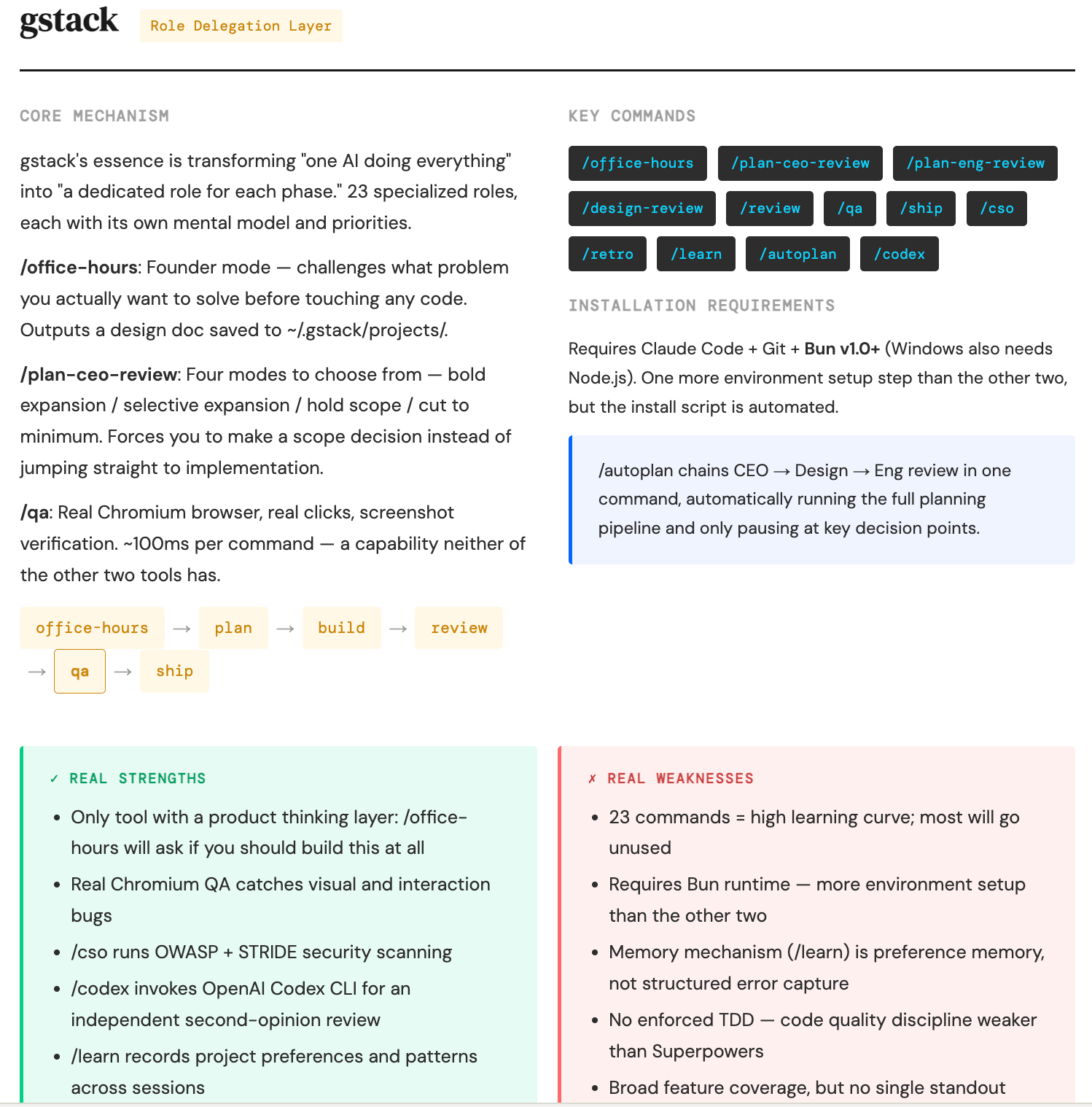
67,000 stars. Built by Y Combinator CEO Garry Tan. It has something neither Superpowers nor CE has: a product thinking layer.
/office-hours — Get Interrogated Before You Write a Single Line
Before you write any code, it questions you: do you actually need to build this? Who will use it? What problem does it solve? Is this feature worth the resource investment?
It produces design documents saved locally. Not lost after the conversation — reusable next time.
Most developers underestimate this step. gstack front-loads the question of “are we doing the right thing?” Most other tools only care about “are we doing the thing right?”
/plan-ceo-review — Four Scope Modes, Forces a Scope Decision Before Dev Starts
Four modes: aggressive expansion, selective expansion, hold scope, cut to minimum.
It forces a scope decision before you enter development. Scope decisions, once made, give execution a boundary. Without boundaries, features expand indefinitely.
/qa — Real Chromium Browser, Real Clicks, Screenshot Verification
This is gstack’s most differentiated technical capability. Visual and interaction bugs only surface in a real browser. If you’re building a Web App, this is something the other two tools don’t have out of the box.
My Honest Take
Interacting with gstack feels more like being questioned by a tough advisor than being helped by a compliant assistant. It encodes a lot of YC methodology. Worth studying.
But one honest observation: too many roles and commands for regular use. 23 specialist roles — CEO, designer, engineer, QA, security officer. You won’t use all of them on the same project. Call them as needed.
Also, the memory system (/learn) captures preferences — your style choices, conventions — not error patterns. Code quality enforcement discipline is weaker than Superpowers.
Compound Engineering: Making Knowledge Survive Across Sessions
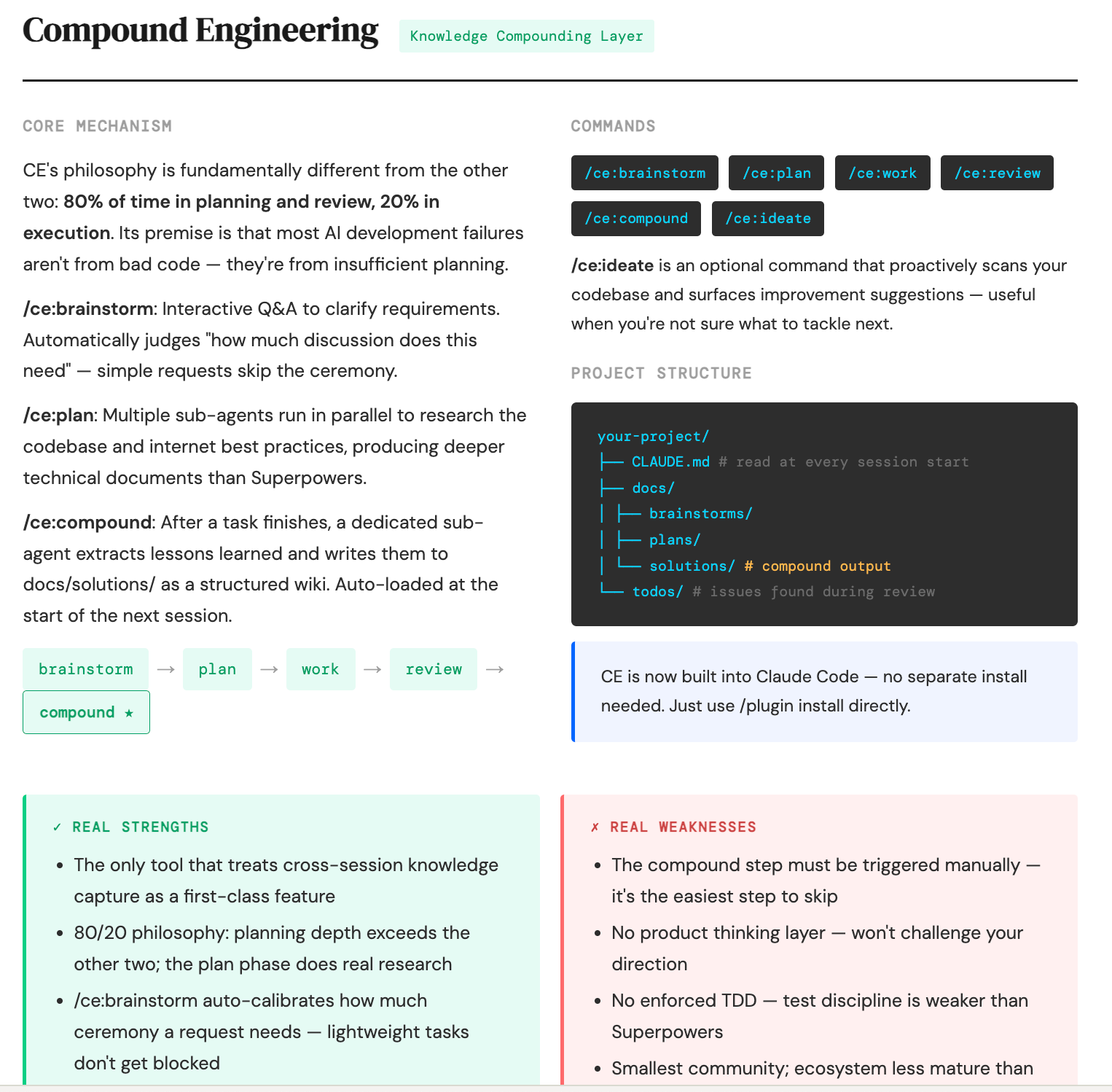
11,000 stars. Built by Every Inc. The first four steps are similar to the others. The real core is step five.
The First Four Steps: brainstorm, plan, work, review
CE’s plan phase goes deeper than Superpowers. It deploys multiple parallel sub-agents that simultaneously research your codebase and current internet best practices, then synthesizes a recommendation. Not sequential — parallel research.
Day to day, the iterate, brainstorm, plan, work commands are smooth and lighter than Superpowers.
/ce:compound — Step Five, the Most Skipped, the Most Critical
A dedicated sub-agent extracts the lessons from the current task and writes them into the project’s docs/solutions/ directory as a structured wiki. The next time you open a new session, Claude reads these files automatically.
Knowledge doesn’t disappear when the session ends.
This is CE’s fundamental differentiator. Claude Code has no native memory — every new session starts from zero. That’s its biggest structural flaw. CE solves it with the file system.
A Warning That Has to Be Said Clearly
If you skip /ce:compound every time, CE is identical to vanilla Claude Code. This isn’t optional. It’s the core value of the tool. Without this step, you’re just using a more complex interface to do the same thing.
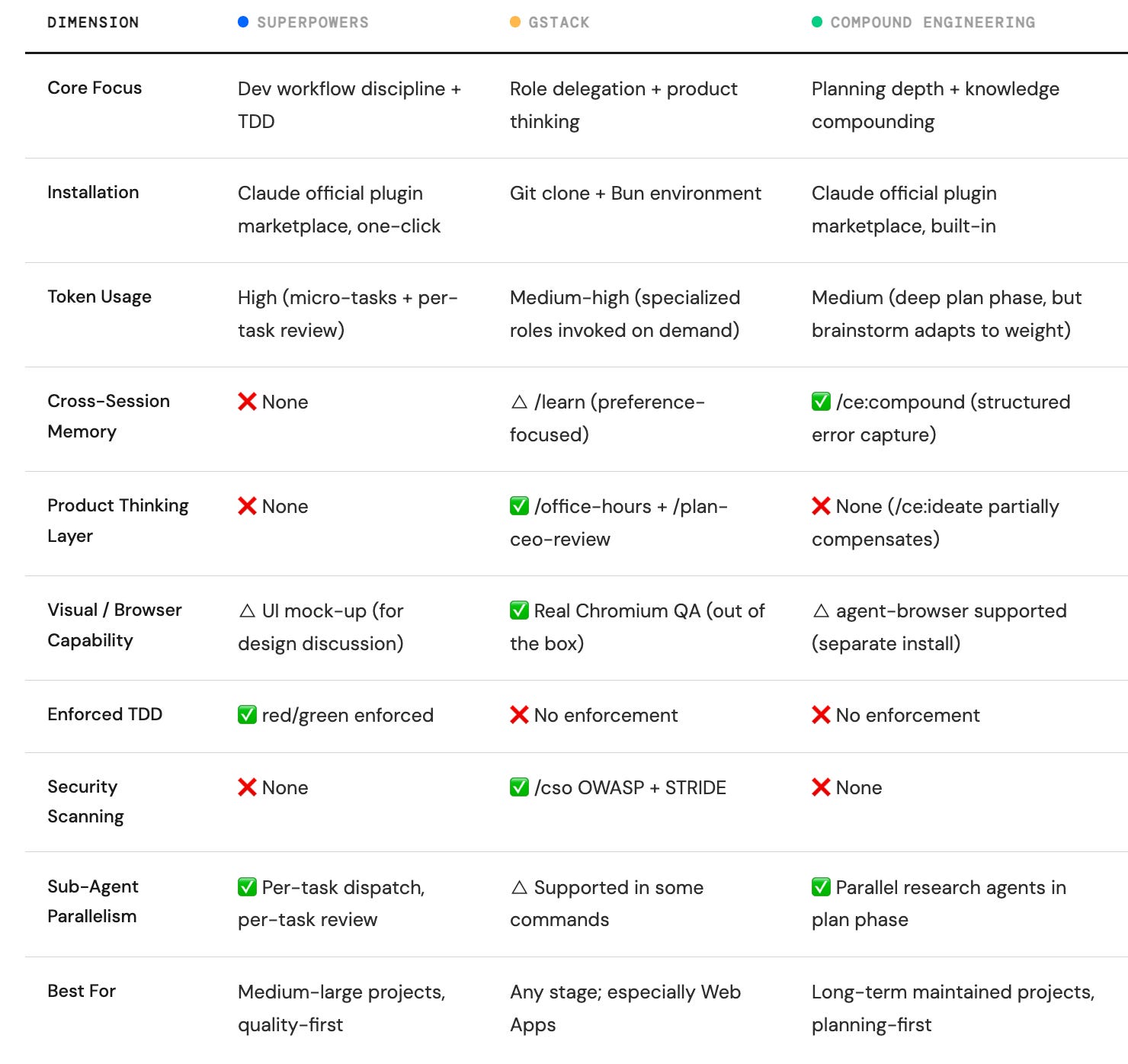
Side-by-Side Comparison: Dimensions, Not Impressions
The Real Leverage: Each Tool in the Stage It’s Best At
The most important thing I took away from testing all three: use any one alone and you only get part of the capability.
The goal isn’t to evaluate tools. It’s to build workflow discipline.
I’ll demonstrate using an actual restaurant ordering Web App — menu display, cart, order status flow, simple admin panel. Tech stack: React + localStorage. A real project with real complexity.
Step One: gstack to sharpen the idea, before writing any code
Run /office-hours and let it interrogate the requirements. Who will actually use this app? Is localStorage sufficient? How far does the admin panel need to go?
Then /plan-ceo-review to lock the scope — I chose “hold scope.” Get the core working before expanding. Then /plan-eng-review to lock the technical architecture and produce design documents.
No code written in this step. But the direction for everything that follows is set.
Step Two: Superpowers for core feature development, where complexity demands discipline
Cart state management, order status flow — both have real complexity and need strict discipline.
Full flow: brainstorm → write-plan → execute-plan. The order status flow (received → in progress → complete) was broken into 6 micro-tasks, each under 3 minutes, all with forced test-first implementation. Every task gets a code review before the next begins.
Token cost is highest here. But these two modules also came out as the most stable code in the entire project.
Step Three: CE for deep planning and knowledge capture, when new features arrive
For the admin panel, CE’s plan phase ran parallel research — sub-agents simultaneously examining the codebase and React state management best practices.
After each phase, run /ce:compound. Problems encountered, solutions found, traps stepped in — all written into docs/solutions/. The next session opens with Claude already knowing the project context. No re-explanation needed.
Step Four: Back to gstack for QA, one real-browser pass before shipping
/qa runs a real Chromium session. Cart quantity display, order status transitions, button interactions — all verified with screenshots. Visual bugs caught in one pass.
The logic of this loop: gstack questions direction before you build, Superpowers guarantees quality during development, CE fights against forgetting, gstack verifies with a real browser before shipping. Every tool in the stage it’s best at.
One Thing All Three Tools Cannot Solve
This needs to be said clearly, or you’ll develop wrong expectations.
These three tools solve “Claude Code has no memory across sessions.” They are not a complete long-term project memory solution.
The real foundation is how well you write your CLAUDE.md.
Architecture decisions. Traps you’ve stepped in. Team conventions. Write them in — any tool, any session can read them. Skills are amplifiers, not replacements.
If your CLAUDE.md is empty, even the best Harness Skill is just helping you run the current session more neatly. Long-run task memory ultimately depends on human maintenance, writing memory index/markdown/wiki for agent use. Tools just reduce the friction of doing that maintenance.
The Protocol: Don’t Install All Three. Pick One That Matches Your Pain.
Pick the one that matches your biggest current pain point. Go deep on it. Layer in others when you’ve understood its limits.
Code quality is inconsistent, you keep skipping steps, test coverage is thin → Start with Superpowers. Let it force you through the full process, even when it feels slow at first.
Ideas are vague, scope keeps expanding mid-project, you’re not sure what’s worth building → Start with gstack. Focus on /office-hours and /plan-ceo-review. Use other commands as needed.
Every new session feels like starting over, you keep stepping on the same problems → Start with CE. But remember: /ce:compound is not optional. It’s the core. Don’t skip it.
All three tools share the same prerequisite: you need to have workflow discipline first.
Tools amplify the discipline you already have. They can’t create it.
Once you understand that, which tool to start with becomes a much simpler question.
zerofuturetech shares hands-on AI tool experience. If this was useful, subscribe — more coming.